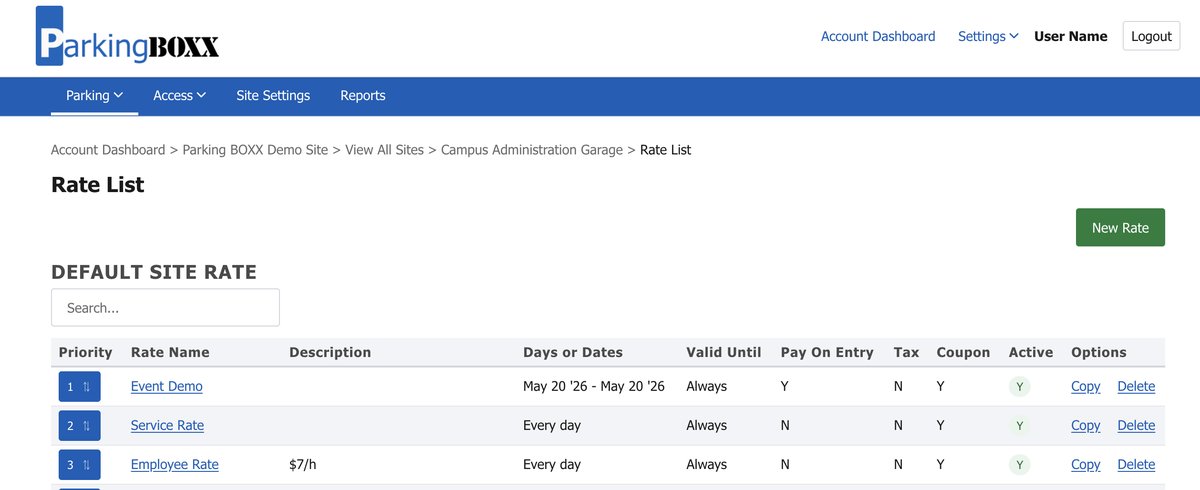
Starting June 25, 2026, you’ll notice something different when you log into CloudEASE. We’ve been rebuilding the look and feel of our most-used pages — and today those changes start rolling out.
This isn’t a new product. Your data, your settings, your workflows — all exactly where you left them. And if you need to access the legacy User Interface (UI), we’ll show you how to do that as well.
 The refreshed CloudEASE UI — cleaner layout, improved contrast, and full WCAG 2.1 AA compliance.
Why We Did This
The new UI is built to meet WCAG 2.1 Level AA accessibility standards — the same benchmark now required under federal accessibility law for public institutions. This means CloudEASE works better for all users, including those using assistive technologies like screen readers or keyboard-only navigation.
A full breakdown of what this standard means and who it applies to is coming in a follow-up article.
What’s Launching on June 25
We’re rolling out the new UI on our highest-traffic pages first. These pages have been tested and used by our internal team for weeks. This phased approach lets us launch priority sections as we continue to expand. Additional pages will follow in the coming weeks as we work through the full platform.
What Is WCAG 2.1 AA?
WCAG stands for Web Content Accessibility Guidelines, a set of technical standards developed by the World Wide Web Consortium (W3C) — the international body that sets the open standards for the web. WCAG defines how digital content should be designed so that people with disabilities can perceive, navigate, and interact with it effectively.
Version 2.1, published in 2018, added 17 new success criteria on top of WCAG 2.0, with expanded coverage for mobile accessibility, low vision users, and cognitive disabilities. It remains the most widely referenced version in law and regulation worldwide.
WCAG defines three conformance levels:
- Level A — Minimum accessibility. Removes the most critical barriers.
- Level AA — The recommended standard. Addresses the most common and significant barriers for users with disabilities. This is the level mandated by law in most jurisdictions.
- Level AAA — The highest level. Typically reserved for specialized services.
Level AA is the legal benchmark — and the level Parking BOXX has engineered its customer-facing software to meet.
Who Does This Apply To?
U.S. Federal Requirements — ADA Title II
In April 2024, the U.S. Department of Justice (DOJ) published a final rule under Title II of the Americans with Disabilities Act (ADA), formally establishing WCAG 2.1 Level AA as the required technical standard for all state and local government entities.
The rule covers:
- Websites, web applications, and web-based portals
- Mobile applications distributed through public app stores
- Digital tools provided by third-party vendors on behalf of a government entity
That last point is critical for parking operators: if your parking management software is deployed at a public university, city-run facility, county hospital, or transit authority, your software is in scope — even if the institution contracts with you as a vendor.
Covered entities include:
- Public universities and community colleges
- Municipal parking authorities and city-operated garages
- Public transit agencies
- County and state government facilities
- Public hospitals and health authorities
- Courts and government service offices
Compliance Deadlines
| Entity Type | Deadline |
|---|---|
| State & local governments serving 50,000+ population | April 26, 2027 |
| State & local governments serving under 50,000 or special districts | April 26, 2028 |
The DOJ issued an Interim Final Rule (IFR) in April 2026 extending these deadlines. The extension does not remove existing obligations — organizations are still expected to actively pursue compliance.
Risks of non-compliance:
- DOJ investigations and enforcement actions
- Private civil rights lawsuits
- Federal penalties and mandatory remediation
- Damage to institutional reputation and procurement eligibility
Canada: AODA and Federal Standards
The Government of Canada’s Standard on Web Accessibility references WCAG 2.0 Level AA for federal institutions, with active movement toward WCAG 2.1. Canadian parking operators serving public institutions — universities, hospitals, municipalities — should treat WCAG 2.1 AA compliance as a procurement expectation today, regardless of formal regulatory timing.
How to Access the Classic Frontend During the Transition
We know change takes getting used to — especially when your team has built routines around a familiar interface.
During the transition, you can switch back to the previous UI at any time:
- Log into CloudEASE
- Click Settings in the top navigation bar
- Select Classic Frontend from the dropdown menu
 Settings → Classic Frontend returns you to the previous interface at any time.
We’ll give advance notice before the legacy interface is retired, with plenty of time to adjust.
What to Expect Next
This article is the first in a short series on the CloudEASE refresh. Coming up:
- A deep dive into accessibility compliance — what WCAG 2.1 AA requires, who it applies to, and what it means for your institution
- Tips from our Customer Success team on making the switch smoothly
Frequently Asked Questions
Will my data or settings change with the new UI? No. The new interface is a front-end update only. All your data, rates, users, configurations, and reports remain exactly as they were.
Which pages are updated on June 25? We’re launching on our highest-traffic pages first. Additional pages will roll out in phases over the coming weeks. You’ll always be able to fall back to the Classic Frontend for any page not yet updated.
How do I get back to the old interface? Go to Settings → Classic Frontend in the top navigation bar. You can toggle between the new and classic UI at any time during the transition period.
When will the Classic Frontend be retired? We haven’t set a hard retirement date yet. We’ll communicate that well in advance — with sufficient time for your team to adjust.
Why is Parking BOXX making this change now? WCAG 2.1 AA is now a legal requirement under U.S. ADA Title II for public institutions — and a procurement expectation in Canada under AODA. Institutions that use our software need their vendors to meet this standard. We’re getting ahead of it.
Does this affect the P-123 mobile apps? The P-123 Pay, Renew, and Reserve apps are also built to WCAG 2.1 AA standards. The June 25 update is specific to the CloudEASE web platform.
Does WCAG compliance affect how my parking kiosks work? The Pay BOXX kiosk interface is designed with WCAG accessibility principles in mind. This update is focused on the CloudEASE web platform; a separate article on kiosk accessibility is planned.
Who do I contact if I can’t find something in the new UI? Reach out to our support team directly — we’d rather hear from you than have you stuck. Contact Support →
Questions? We’re Here.
If anything in the new UI catches you off guard or you can’t find something you’re looking for, reach out to our support team.
Parking BOXX is a North American parking technology manufacturer serving commercial, university, healthcare, and municipal markets across the continent. CloudEASE is our cloud-based parking management platform.